
An Unchained trust account is titled to the entity of your trust. Consult a legal professional in your jurisdiction for help when forming a trust. You must already have established your trust when you create the Unchained trust account.
Note: We only service accounts with a U.S. residential address. We do not allow the creation of international accounts at this time.
We have separate guides for setting up different accounts:
Register your email and select your account type:
- Navigate to my.unchained.com and click Sign up.
- Enter your email address and verify the code sent to your email.
- Choose your intention for the account. For a trust account, select Secure bitcoin in a trust.
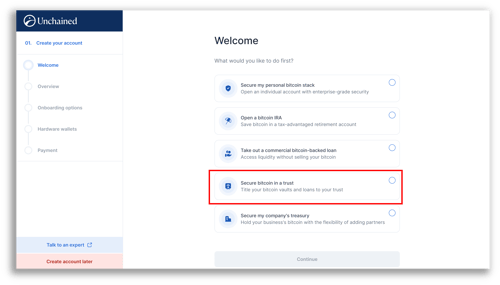
- Select an onboarding option: Self-Setup, Concierge Onboarding, or Unchained Signature which is our best plan.
- Select if you need hardware wallets. All Unchained vaults require two hardware wallets. You may bring your own or purchase from us.
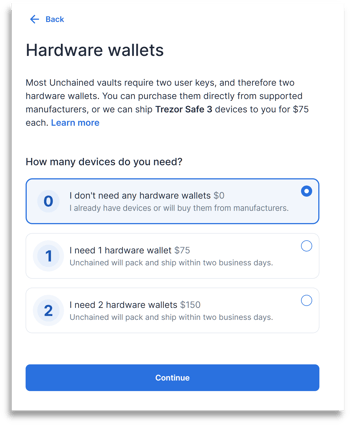
- Add a payment method and check out.
- Complete your basic profile. You will need to provide us with your personal information.
- Review the provided information and Submit to complete your basic profile.
- If your basic profile is not approved immediately, it may take up to two business days for our team to review the application.
- Once approved, complete the following trust information:
- Confirm that you are the trustee.
- To create a trust account, you must be a trustee of an existing trust. If the grantor is different than the trustee, the trustee should apply for the trust.
- Fill out the application with your trust information:
- Trust name
- Trust type (revocable or irrevocable)
- Initial execution date
- Mailing address
- You do not need to upload the original trust agreement
- Enter the information for the Grantor(s) for your trust:
- Name
- Ability to revoke the trust
- EIN
- If no EIN exists, please provide the SSN or Tax ID number of the grantor or other applicable party.
- Add your trustees and enter their personal information.
- Full Legal Name
- Date of birth
- SSN
- Home address
- Identification document
- Review and certify the Trust Certification document.
- Our team will review your application. You’ll receive an automated email when we approve the account.
- Recommended: Enable multi-factor authentication (MFA) for increased account security.