
If your existing IRA holds bitcoin through a checkbook LLC or Trust, you may be eligible to transfer the bitcoin in-kind to an Unchained IRA. Because Fortis Bank cannot accept ownership of the LLC or Trust itself, your current IRA custodian must authorize and document the removal of the bitcoin from the checkbook entity and its transfer as an asset of your IRA.
Your current IRA custodian must confirm that the bitcoin or USD is an asset of your existing IRA, authorize its transfer to Fortis Bank, and confirm that no ownership interest in the LLC, Trust, or other checkbook entity is being transferred to Fortis.
After the transfer is complete, you are responsible for dissolving or terminating the checkbook entity, if applicable.
What you’ll need:
- An Unchained IRA with an active vault
- A checkbook IRA entity that holds only bitcoin and/or USD
Important: Fortis Bank can only accept bitcoin and/or USD from this checkbook IRA transfer process. Fortis cannot accept ownership of the LLC, Trust, or other checkbook entity itself.
If your checkbook entity holds assets other than BTC or USD, you cannot proceed with this funding method unless those assets are converted to BTC or USD.
How to perform the checkbook IRA transfer:
1 . Submit an IRA-to-IRA transfer request.
- Sign in to your Unchained account and select your IRA.
- Navigate to the IRA Cash balance tab at the top navigation bar, and click Fund.
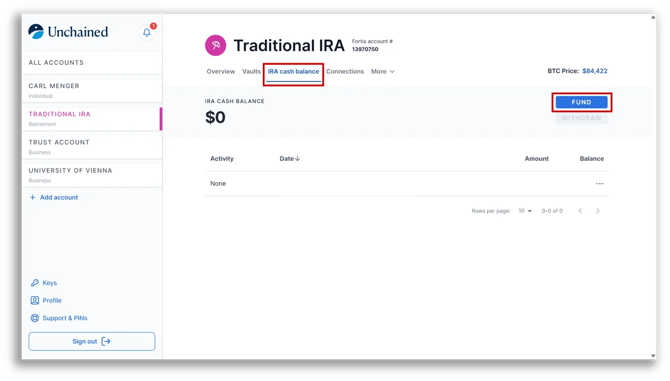
- On the next screen, select IRA-to-IRA transfer and press Continue.
- Select the Partial transfer option.
- While entering the Releasing custodian details, choose This is a checkbook IRA and I hold the private keys to this bitcoin.
- Sign and submit the request.
2. Complete the Checkbook IRA Addendum
As part of the transfer process, the Checkbook IRA Addendum confirms that the asset being transferred to Fortis Bank as IRA custodian is the bitcoin held by the checkbook entity.Your current IRA custodian must either:
- Sign the applicable section of the Checkbook IRA Addendum confirming the transfer, or
- Provide separate documentation that specifically identifies the amount of BTC and/or USD being transferred from the checkbook entity.
If the documentation does not clearly identify the BTC and/or USD being transferred, Fortis may reject the transfer, and updated documentation will be required from your current custodian.
3. Wait for Fortis approval
Once your transfer request and required documentation have been submitted, Fortis will review the transfer and coordinate with your current IRA custodian as needed.
You may contact your current custodian during this process to confirm that they have received and are processing the request.
Do not transfer bitcoin to your Unchained IRA vault until you have received formal approval. This helps ensure the movement is properly documented as an IRA transfer.
4. Transfer bitcoin into your Unchained IRA vault.
Once Fortis receives the required confirmation from your current custodian and approves the transfer, Unchained will work with you to transfer the approved bitcoin from your checkbook entity wallet into your Unchained IRA vault.
Any approved USD being transferred from the entity will be deposited into your IRA cash balance at Fortis Bank.
To obtain your IRA vault deposit address:
- Navigate to your IRA vault page.
- Go to Vault tools.
- Select Request deposit address.
- Copy the provided vault address.
- Send the approved bitcoin from your checkbook entity wallet to that address.
Only transfer bitcoin after Fortis has approved the transfer.
5. Dissolve your checkbook entity
After the assets have been transferred, you are responsible for dissolving or terminating the checkbook entity, as applicable.
A Trust may terminate according to the terms of its governing documents. An LLC may require additional steps, such as filing articles of dissolution or termination with the applicable Secretary of State.
You should consult your entity documents and your own attorney or tax advisor regarding any required dissolution steps.
Fortis Bank, Unchained Capital Inc., and your prior IRA custodian do not make representations regarding the tax or legal implications of the transfer or dissolution of your checkbook entity.
No contents of this article may be relied upon as tax, legal, or financial advice, as they have not been tailored to you and have not been reviewed by any attorney, financial advisor, or tax professional. For any questions related to your own specific situation, please consult with your own attorney, tax professional, and/or licensed financial advisor.